CornerFloat
A native macOS utility that keeps live web tools one glance away—designed and built with AppKit and WebKit around deliberate privacy, persistence, testing, and release boundaries.
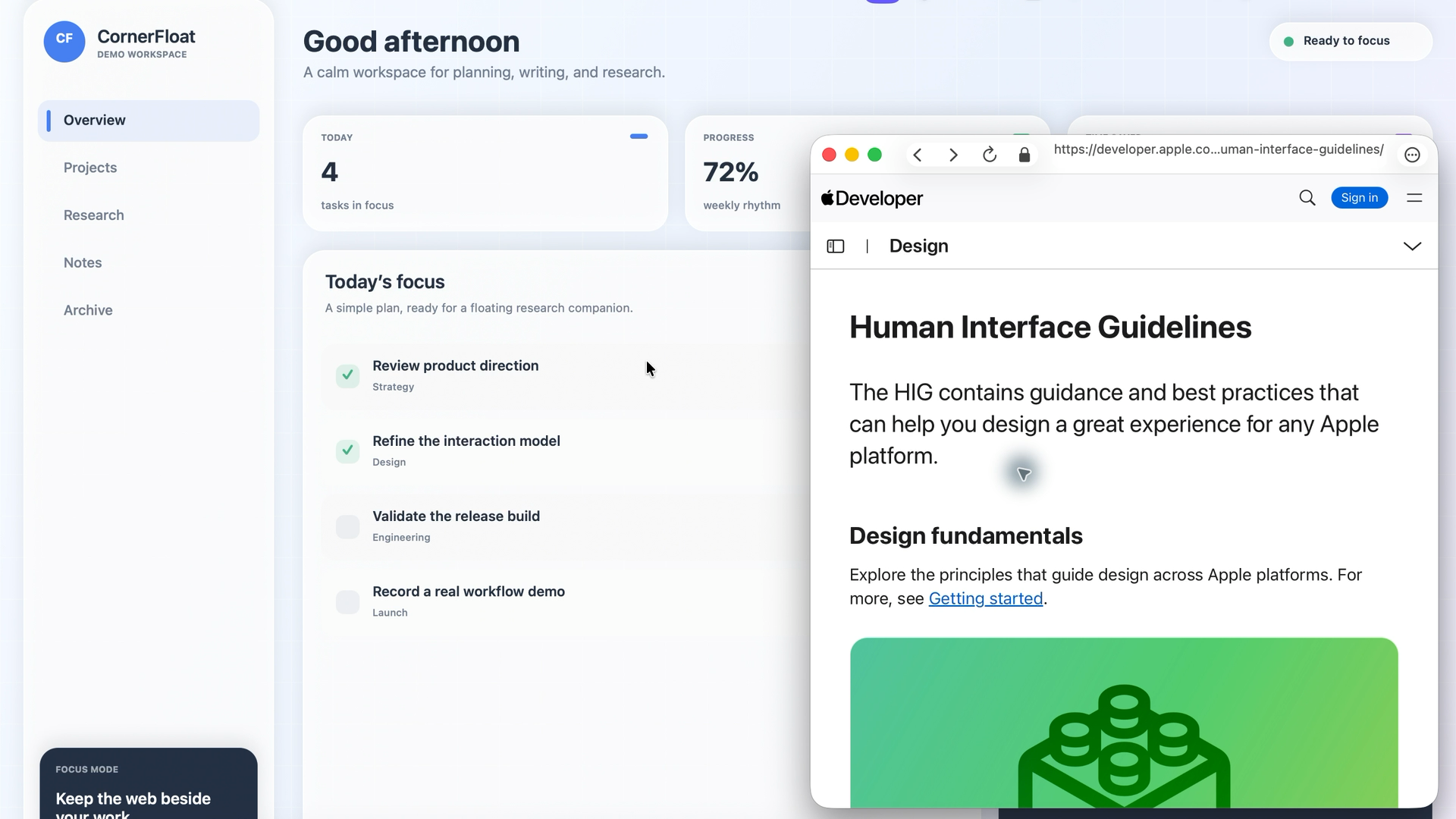
CornerFloat began with a small productivity frustration: the page supporting my work kept disappearing behind the work itself. I designed and built a native macOS menu-bar app that turns selected websites into resizable, always-on-top panels and restorable workspaces.
More than a floating window, the project became an exercise in product scope, native interaction design, browser safety, durable local data, and release engineering.
From friction to a focused product
The tempting version of this idea was “build another browser.” I chose a narrower product boundary: live web workspaces that stay beside the task. CornerFloat is not screen mirroring, a browser extension, or a Stage Manager replacement. That scope made the experience clearer and allowed core use without Accessibility, Input Monitoring, Screen Recording, camera, or microphone access.
What I built
Native AppKit panels with standard window controls, a configurable global show/hide shortcut, edge auto-hide, click-through, opacity, multiple-display support, and all-Spaces behavior.
WebKit browsing with tabs, a smart address bar, uploads and downloads, popups, JavaScript dialogs, and actionable failure states.
Quick Sites, favourites, recents, and saved multi-panel workspaces that restore the user’s setup.
Native Settings, optional Launch at Login, and versioned JSON library export/import with validation and atomic replacement.
The interface is deliberately familiar: standard macOS window behaviour around a focused web surface, with the product’s complexity kept out of the way.
The engineering behind the calm interface
Native by default
AppKit owns the menu bar, floating-window lifecycle, keyboard behaviour, and system integration. WebKit supplies the browser engine. That keeps the app small and platform-native without bundling Electron or a second copy of Chromium.
Explicit browser-safety boundaries
Unsafe address-bar schemes are blocked, external app launches require confirmation, and failed form submissions are never silently replayed. Downloads are staged beside their destination and replace it only after WebKit reports success; transient authentication parameters are removed before URLs enter preferences or the local library.
Local data designed to evolve
Versioned decoding preserves compatible favourites, recents, Quick Sites, and workspaces while safely ignoring retired records. A library created by a newer schema opens read-only before evolving nested records are decoded, avoiding accidental recovery rewrites. Website cookies and sessions remain separate from exported workspace data.
Verification as part of the product
I separated verification by boundary instead of treating one test suite as proof of everything:
Pure helper checks cover navigation, persistence, import, and release rules.
Loopback-only WKWebView integration tests exercise real browser behaviour without depending on the public internet.
AppKit acceptance and lifecycle diagnostics exercise real windows, global shortcuts, and menu-bar behaviour on a logged-in Mac.
The formal release path compiles arm64 and x86_64 separately, combines them as Universal 2, and verifies the app and bundled Sparkle artifacts.
Signing, notarisation, display changes, sleep, passkeys, and update installation are deliberately kept in a manual release-evidence checklist rather than being overstated as CI coverage.
What this project demonstrates
Product judgement: turning a daily friction into a narrow product with explicit non-goals.
Native systems work: integrating AppKit and WebKit across windows, menus, shortcuts, browsing, downloads, and lifecycle.
Security and privacy thinking: defining permission, navigation, external-launch, authentication, and local-data boundaries.
Reliability: designing versioned persistence, validated import/export, atomic file replacement, and layered verification.
Open-source readiness: maintaining bilingual documentation, architecture and decision records, a roadmap, contribution guidance, governance, and a release checklist.
Current status
CornerFloat is open source and in active development. The current source preview is version 0.8.0 (build 11); there is no public signed binary or GitHub Release yet. Some providers may reject sign-in inside embedded WebKit, so “Open in Default Browser” remains the explicit fallback.
Explore the source, architecture, roadmap, and build instructions on GitHub → (opens in a new tab)